
USee Bell1.3 - App Store
You'll be able to see results in few seconds.
Publisher Description


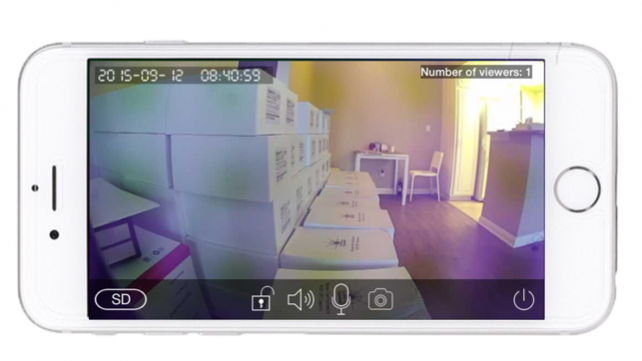




A visitor presses the doorbell and doorbell sends a live feed alert to your smart phone. See, hear, and speak to your visitor with free APP for selected iOS devices, no matter where your day takes you.
High-quality picture with a low data rate, so your video loads quickly and does not drop when you're a cellular network. Wide angle lens, see more of your doorstep with this wide-angle lens. It's the only video doorbell solution with on-demand, which lets you see out of Xenon video doorbell at any time from the APP.
A powerful motion sensor provides better performance and faster alerts when your visitor doesn't press the button; Xenon camera and optics helps provide the best picture quality when the light behind your visitor is too bring. The contrast toggle is any easy switch. Review what's been happening at your door while you're away. Watch recorded video for when you can't answer the door. It's like a voice mail with video from your door.
Mar 3, 2017
Version 1.3
This app has been updated by Apple to display the Apple Watch app icon.
1、增加AP配网功能;
2、增加视频本地录制功能;
3、增加180全景设备的自动巡航功能;
4、优化网络连接;
5、优化界面;
About USee Bell
The company that develops USee Bell is Ping Kwong Yip. The latest version released by its developer is 1.3.
To install USee Bell on your iOS device, just click the green Continue To App button above to start the installation process. The app is listed on our website since 2017-03-03 and was downloaded 0 times. We have already checked if the download link is safe, however for your own protection we recommend that you scan the downloaded app with your antivirus. Your antivirus may detect the USee Bell as malware if the download link is broken.
How to install USee Bell on your iOS device:
- Click on the Continue To App button on our website. This will redirect you to the App Store.
- Once the USee Bell is shown in the iTunes listing of your iOS device, you can start its download and installation. Tap on the GET button to the right of the app to start downloading it.
- If you are not logged-in the iOS appstore app, you'll be prompted for your your Apple ID and/or password.
- After USee Bell is downloaded, you'll see an INSTALL button to the right. Tap on it to start the actual installation of the iOS app.
- Once installation is finished you can tap on the OPEN button to start it. Its icon will also be added to your device home screen.
Program Details
System requirements
Download information
Pricing
Version History
version -
posted on 2021-02-09
version 1.3
posted on 2017-03-03
3 Mar 2017 Version 1.3
1、增加AP配网功能;
2、增加视频本地录制功能;
3、增加180全景设备的自动巡航功能;
4、优化网络连接;
5、优化界面;
version 1.3
posted on 2017-03-03
Mar 3, 2017 Version 1.3
1、增加AP配网功能;
2、增加视频本地录制功能;
3、增加180全景设备的自动巡航功能;
4、优化网络连接;
5、优化界面;
version 1.3
posted on 2017-03-03
Mar 3, 2017 Version 1.3
This app has been updated by Apple to use the latest Apple signing certificate.
1、增加AP配网功能;
2、增加视频本地录制功能;
3、增加180全景设备的自动巡航功能;
4、优化网络连接;
5、优化界面;
version 1.3
posted on 2017-03-03
Mar 3, 2017 Version 1.3
This app has been updated by Apple to display the Apple Watch app icon.
1、增加AP配网功能;
2、增加视频本地录制功能;
3、增加180全景设备的自动巡航功能;
4、优化网络连接;
5、优化界面;
version 1.3
posted on 1970-01-01
3 мар. 2017 г. Version 1.3
1、增加AP配网功能;
2、增加视频本地录制功能;
3、增加180全景设备的自动巡航功能;
4、优化网络连接;
5、优化界面;
version 1.3
posted on 1970-01-01
2017年3月3日 Version 1.3
1、增加AP配网功能;
2、增加视频本地录制功能;
3、增加180全景设备的自动巡航功能;
4、优化网络连接;
5、优化界面;
Disclaimer
Official App Store Link
We do not host USee Bell on our servers. We did not scan it for viruses, adware, spyware or other type of malware. This app is hosted by Apple and passed their terms and conditions to be listed there. We recommend caution when installing it.
The App Store link for USee Bell is provided to you by apps112.com without any warranties, representations or guarantees of any kind, so access it at your own risk.
If you have questions regarding this particular app contact the publisher directly. For questions about the functionalities of apps112.com contact us.
